
JeetBuzz App Download for Android in Bangladesh
The JeetBuzz app for Android combines sports betting, live betting, casino games, BDT payments and account management in one mobile interface. Users in Bangladesh can install it through the JeetBuzz APK and sign in with the same account used on the website.
The mobile interface includes cricket and other sports markets, live betting, casino games and account management. Existing users can use the same account details on the app and website, while new users can create an account before getting started.
Updated: August 2026
Benefits of the JeetBuzz Mobile App for Android and iOS
The JeetBuzz mobile application brings the main platform features into a mobile-friendly interface for users who prefer betting or managing their account from a smartphone.
- Sports betting: access cricket, football, basketball, tennis and other available sports and competitions.
- Live betting: follow events in progress and view markets and odds that update during a match.
- Casino games: browse slots, live casino and other available game categories from a mobile device.
- Account access: log in, check account information and manage activity using the same JeetBuzz account as on the website.
- BDT payments: users in Bangladesh can access supported local deposit and withdrawal methods from their account.
- Mobile navigation: major sportsbook, casino, promotion and account sections are adapted for smaller screens.
How to Download the JeetBuzz App for Cricket and Sports Betting
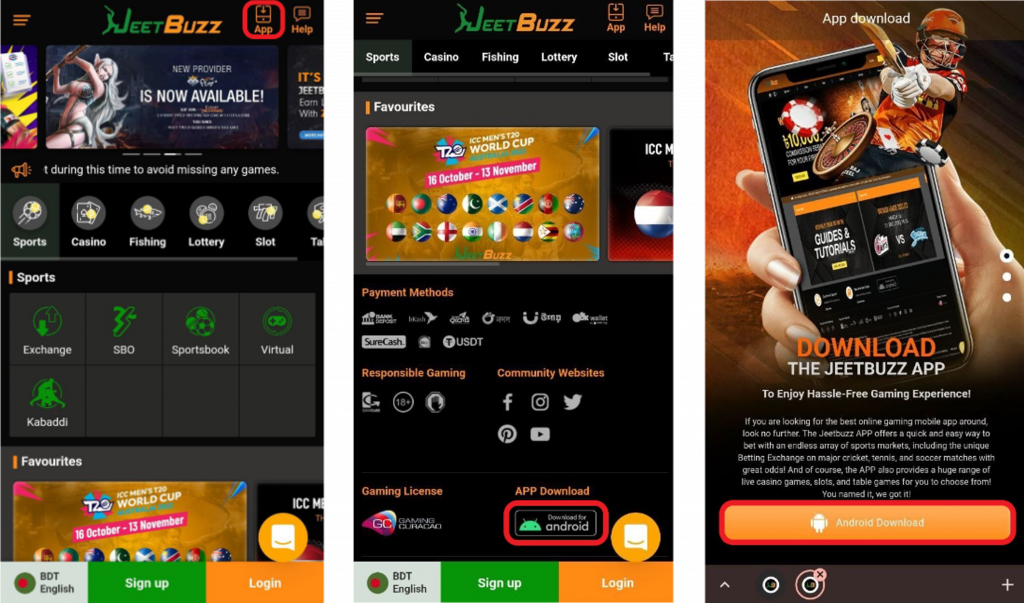
Android users can download the JeetBuzz APK and install the application directly on a compatible device. The download process takes only a few steps.
Download the JeetBuzz App for Android (APK)
- Open the JeetBuzz website from your Android device.
- Select the option to download the mobile app.
- Start the JeetBuzz APK download.
- Wait until the APK file has finished downloading.
- Open the downloaded installation file.
- Follow the Android installation prompts.
- Launch the JeetBuzz app.
- Log in to your existing account or create a new account.
Android may ask for permission before installing an APK downloaded through a browser. Follow the security instructions displayed by the device before continuing with the installation.
JeetBuzz APK System Characteristics
| Feature | Details |
|---|---|
| Application | JeetBuzz |
| Platform | Android |
| Installation format | APK |
| Main market | Bangladesh |
| Currency | BDT |
| Languages | English, Bengali |
| Account | Same JeetBuzz account as website |
| Sports betting | Pre-match and live |
| Casino access | Available |
| Minimum age | 18+ |
App version, APK size and Android requirements are listed with the current download. Users should check the information accompanying the current download instead of relying on an older version number.
How to Install the JeetBuzz APK
After downloading the APK, open the file from the browser downloads section or the Downloads folder on your Android device.
If Android blocks the installation, the device may display a prompt requesting permission to install an application from the browser or file manager being used. Follow the on-screen instructions and then reopen the APK to complete installation.
Once installed, open the app and sign in with your existing JeetBuzz account details.
How to Update the JeetBuzz App
To update JeetBuzz on Android, download the latest APK and install it over the existing version.
- Check for the latest available JeetBuzz APK.
- Download the current installation package.
- Open the APK on the same Android device.
- Follow the update instructions displayed by Android.
- Launch JeetBuzz after the update is complete.
Using the current release can help maintain compatibility with newer platform features and Android versions.
JeetBuzz App for iOS
JeetBuzz can also be accessed from an iPhone or iPad through its mobile interface. Availability and installation options for iOS can change, so users should check the current mobile access options displayed by JeetBuzz rather than relying on old App Store version, file-size or compatibility information.
Users who do not want to install an application can access JeetBuzz through a compatible mobile browser.
JeetBuzz Bangladesh Mobile Application FAQ
Where can I download the JeetBuzz APK?
Android users can use the current JeetBuzz app download option to obtain the APK installation package. Because APK versions can change, check the current download information before installing or updating the app.
How do I install the JeetBuzz app on Android?
Download the APK, open the downloaded file and follow the Android installation instructions. Depending on your device settings, Android may request installation permission for the browser or file manager.
Can I use my existing account in the JeetBuzz app?
Yes. Existing users can use their current account details to access JeetBuzz from the mobile application. For account-access instructions, see the JeetBuzz Login page.
How secure is the JeetBuzz app?
Users should protect their account credentials, use the current version of the application and check account information before confirming transactions. JeetBuzz also requires eligible users to meet its account verification and age requirements.
How do I make a deposit or withdrawal on JeetBuzz mobile in Bangladesh?
Users can access available BDT payment options from their account. JeetBuzz supports BDT payments through bKash, Nagad, Rocket, UPay and TAP. Limits and processing times differ by payment method.
Are bonuses and promotions available through the JeetBuzz app?
Promotions are available from the Promotions section in the app. Each offer lists its eligibility, wagering and validity terms.